Technology

One stack from simulation to the real robot

Our deployment software runs the same automated pipeline for every site. The robot interface, the safety layer and the model of the site are shared between simulation and hardware, so a result in simulation means something on site.

Architecture

Built so nothing is rewritten for deployment

The gap between simulation and a real robot is mostly software that changes on the way. We design the stack so the code you test is the code you install.

01

One robot interface

Our software talks to the robot through the manufacturer's interface in every environment. On the Unitree G1 the controller sends motor targets at 500 Hz and reads joint states, in MuJoCo, in Isaac Sim and on the robot. On the AgiBot G2, a simulated GDK lets GDK code run on the simulated cell unchanged.

02

One safety layer

Every input, from a teleoperator to a trained policy, asks a mode manager for control. A control lease, a watchdog, an emergency stop gate and speed zones decide what moves, and only one process ever sends joint commands.

03

One model of the site

One layout file generates the photoreal scene, the physics world, the colliders for the motion planner and the maps. A map made in one simulator is correct in the other, and a change to the site is made once.

Deployment automation

From demonstrations to a policy that has earned its place

  1. 01 Site modelModel the site and the robot

    Generated from one layout file, with build checks for blocked doors and overlapping objects. The robot model comes from one source file for every simulator.

  2. 02 DemonstrateShow the robot the task

    Teleoperation from a keyboard over SSH, a SpaceMouse or a webcam with hand tracking, with no VR headset needed. Scripted generators randomise product positions and labels for volume.

  3. 03 RecordKeep every frame in sync

    Head camera, depth, joint states and commands go to MCAP, then HDF5 and LeRobot-style datasets. The compressed profile records at about 1.1 MB/s, against 78 MB/s raw.

  4. 04 TrainLearn the skill

    Imitation learning such as ACT and behaviour cloning for manipulation. PPO in MuJoCo MJX for locomotion and whole-body control, with 2,048 robots in parallel on one GPU and a teacher-student curriculum.

  5. 05 ValidatePass the gates

    Each training stage has pass gates, and validation uses whole held-out episodes. The trainer keeps the checkpoint that passes, not the last one.

  6. 06 DeployMove to the robot

    Policies export to ONNX and run inside the same controller on every backend. The ROS 2 stack, with slam_toolbox, AMCL and Nav2, moves to the robot unchanged.

A recorded demonstration, replayed from its data file. Commanded and measured arm joints agree within 0.0012 rad. AgiBot G2 pack-off cell.

Data

Demonstrations you can audit

Every episode is a file you can open, replay and check. We redraw the robot from the recorded joints next to the camera frames, so a bad demonstration is caught before it reaches training.

The validation split uses complete episodes, so no frame of a validation episode leaks into the training data.

The mode manager at work. In HOLD the robot ignores velocity keys, and it moves again only after an explicit resume. WardZero, ROS 2 on MuJoCo at 500 Hz.

Safety

Seven modes, one decision maker

The robot runs in one of seven modes, from DAMP, with the motors off, to HOLD, which stops it in place. A watchdog sets HOLD if the interface signal stops, and a hardware emergency stop has priority over every input.

Speed zones on the map set the maximum speed in each area, so the robot slows near doors and in busy corridors.

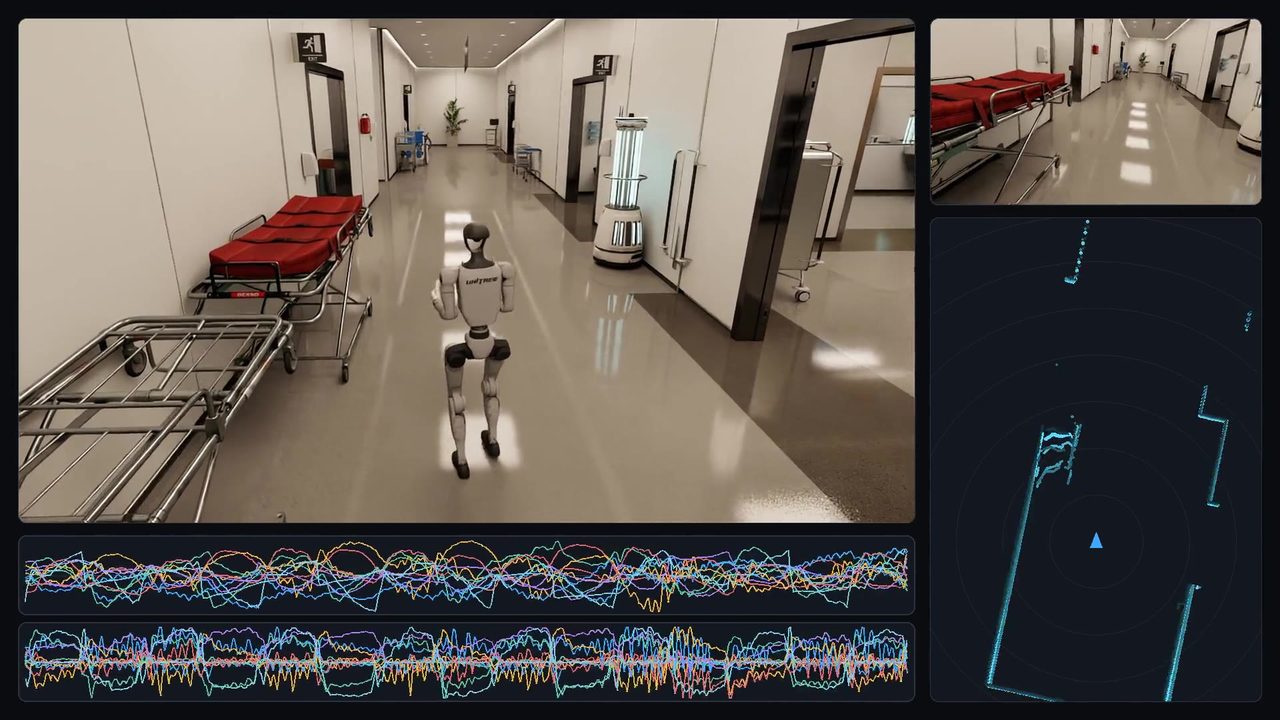
Mapping while navigating. About 5.7 hours of simulated walking through the hospital and surgical wing, shown in 27 seconds. WardZero.

Autonomy

Standard navigation, measured against ground truth

We use standard ROS 2 packages where they are good enough, and they usually are: slam_toolbox for mapping, AMCL for localisation and Nav2 for planning. Because the simulated building is exact, we can measure the map: in WardZero, 99.6% of mapped wall cells sit within 0.10 m of the true walls.

Toolchain

What we build with

Open, widely used tools wherever we can, so your team can maintain what we leave behind. Everything runs headless in Docker, on a workstation or on cloud GPUs.

Simulation

  • NVIDIA Isaac Sim
  • AgiBot Genie Sim
  • MuJoCo and MJX

Robotics

  • ROS 2 Jazzy
  • MoveIt 2
  • Nav2 and slam_toolbox

Learning

  • PyTorch
  • PPO on MuJoCo MJX
  • ONNX for deployment

Data and tools

  • MCAP, HDF5, LeRobot format
  • Foxglove
  • Docker

See the pipeline on a real project

Both case studies show each stage, with the numbers and the limits.